
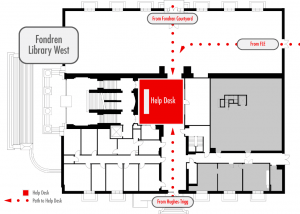
 At the end of May, the Help Desk returned to Fondren Library. Our new expanded space is in the west lobby adjacent to the Collaborative Commons and Starbucks Café. If you haven’t yet seen the new renovations in Fondren Library, take a few minutes to come see the improvements. And, when you do, come check out the new help desk area. We’re excited to continue to providing our service back in Fondren Library. Continue reading The IT Help Desk Returns to Fondren Library!
Category: Announcement
Gaining Visibility into IT Projects
In addition to providing day to day operation of IT services, OIT is engaged in a number of projects to support the University. For instance, even if a department has selected a new software vendor, IT is routinely called upon to assist at some level with an implementation. As we receive projects on a daily basis, each one is reviewed, approved, and then entered into TeamDynamix, our Project Management software. Project Managers are then selected and are responsible for spearheading the project, including communicating with appropriate personnel. We make these project available for review through TeamDynamix.
Project Highlights
We currently have over 60 projects that we are managing. Included are highlights of some of our critical summer projects: Continue reading Gaining Visibility into IT Projects
SMU Mobile App Updated for Fall 2016
Update: OIT is winding down its SMU Mobile app for iPhone and Android. On February 12, 2018, SMU Mobile will no longer appear in app stores and will stop working after February 28, 2018.
 Last year, we released a brand-new SMU mobile app for both iOS and Android devices. This year, we’ve made the app even better!
The SMU Mobile App includes quick information about many campus services within easy reach; like dining hall menus, campus maps, your class schedule, sporting event schedules, and more. Soon, you will be able to add and drop courses directly from the app as well, so you no longer have to trek to a computer to log into my.SMU. The add/drop is currently in beta, and we hope to enable this feature for everyone in coming weeks. Continue reading SMU Mobile App Updated for Fall 2016
OIT Resources and Support for Faculty & Staff
Many University employees are unaware of the vast resources available at their fingertips. As we have entered the back to school season we’ve put together this list of resources and reminders for you. As always, if you have any questions about any of them feel free to reach out to the IT Help Desk. Continue reading OIT Resources and Support for Faculty & Staff
Box Features Get Deprecated
 In Box’s effort to improve the user experience, they sometimes remove functionality to make room for an even better product. Starting in September, a few Box features will be withdrawn.
Support for Flash Video Previews
Starting on September 5, 2016, Box will end support for previewing flash video files (.flv, .f4v and .swf file extensions) in the most current Box web experience. You will need to use an alternative to viewing flash video files, such as downloading them and using a desktop application. Here is the list of file types that Box preview supports.
End of Support for Internet Explorer (IE) Browser Versions 9 and 10
Box will be ending support for IE versions 9 and 10 on September 26, 2016. Compatibility mode for any of the unsupported browsers is also unsupported. Box only supports the two latest browser versions. As of January 12, 2016, Microsoft stopped supporting IE browsers 9 and 10 for the Windows OS – Windows 7, Windows 8 (64-bit only) and Windows 10. Microsoft supports IE 11 on Windows 7 and Windows 8 and Microsoft Edge on Windows 10.
Prior to the end of support date, Box will notify users on IE 9 and IE 10 browsers via an in-app banner that their browser will soon be unsupported. After the end of support date, the in-app banner will say that the browser is out of date and that the user needs to upgrade to a supported browser. Eventually, users who try to access Box on either of these unsupported browsers (including on the associated compatibility modes for these browsers) will be blocked entirely from using Box (via a blocking page) until they have upgraded to a supported browser.
For more information on Box@SMU, please visit smu.edu/box.
